A programming language for children
Real programming, in words children already know
Children speak plain English, love to draw and know their shapes. VeeLang puts the three together, then builds real programming on top, one idea at a time: from a first circle to games you can play.
No sign-up · No ads · Works in any browser
Getting the pens ready…
What you can do
Pictures, animations and games, in plain words
Each of these is a real programming idea, and each one is a few lines a child can read out loud.
-
Commands
Draw with words
Say what to draw, where, and what it looks like.
draw rectangle grass at 0, 120
  having width 240, length 40,
  fill "yellowgreen"
draw circle sun at 190, 45
  having radius 25, fill "gold"
draw rectangle house at 40, 60
  having width 80, length 60,
  fill "tomato"
-
Sequence and time
Make it move
Move, turn and grow, one step after another.
draw square box at 30, 60
  having size 40, fill "tomato"
move box to 170, 60 in 1 second
turn box by 180 in 1 second
box.fill = "gold"
move box to 30, 60 in 1 second
-
Events and variables
Build games
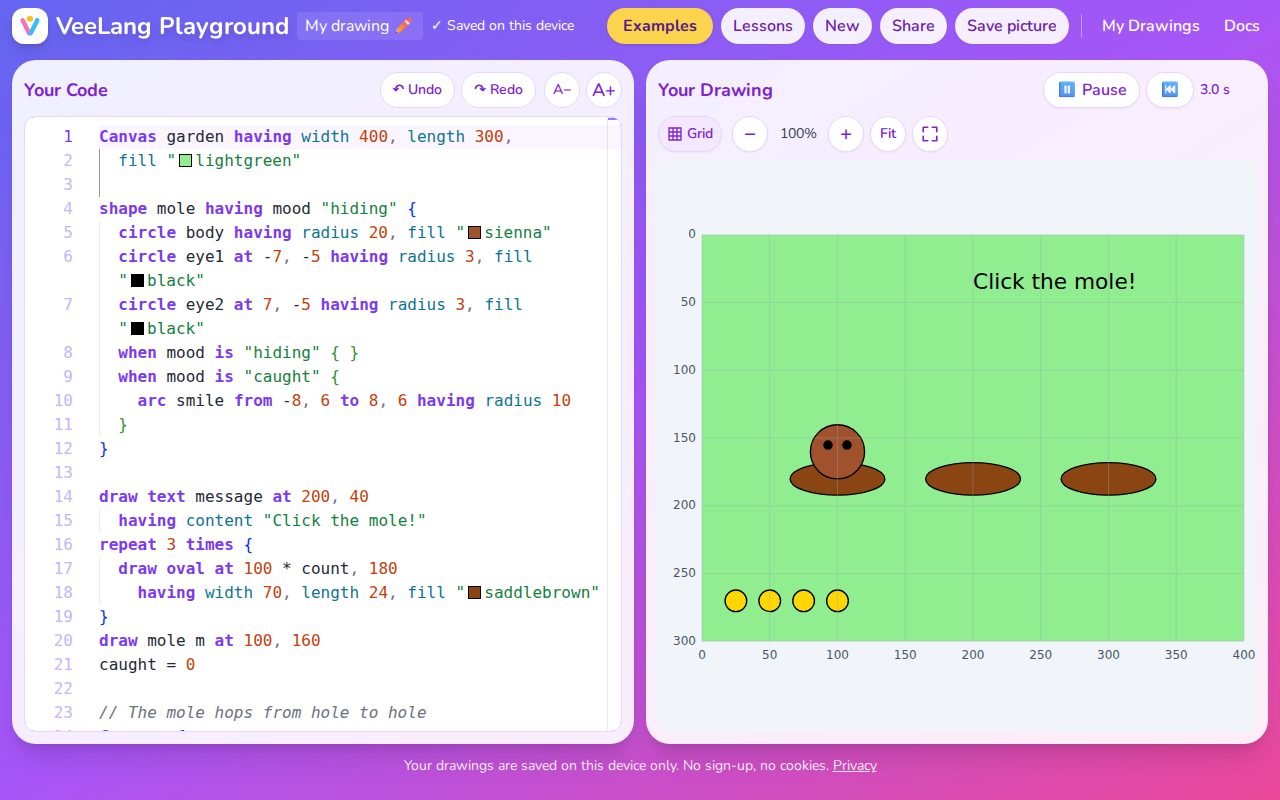
Clicks make things happen, and variables keep the score. Pop it!
pops = 0 draw text score at 75, 25 having content "Click 5 times" draw circle balloon at 120, 90 having radius 25, fill "tomato" when balloon is clicked { pops = pops + 1 grow balloon by 1.2 in 0.2 seconds if pops is 5 { score.content = "You win!" balloon.fill = "gold" } } -
Functions
Make your own shapes
Write a recipe once, then draw it with different settings.
shape face having size 60, skin "gold" {
  circle having radius size / 2,
    fill skin
  circle at -size / 5, -size / 8
    having radius size / 12, fill "black"
  circle at size / 5, -size / 8
    having radius size / 12, fill "black"
}
draw face at 60, 80
draw face at 160, 80
  having size 110, skin "pink"
There's more: loops, shapes that follow other shapes, layers. Learn them in the tutorials
Why it works
Start with what children already have
Plain English
Code reads the way children talk: draw circle at 100, 100. No symbols to memorise before the first picture.
Drawing
Every line of code makes something they can see, so they know straight away whether it worked, and want to make the next thing.
Shapes
Circles, squares and triangles are things they already understand, so their attention goes on the programming.
For families and classrooms
Safe to hand to a child
- Free, with no accounts. Nothing to sign up for and nothing to buy.
- Drawings stay on the device. They're saved in the browser. A shared drawing travels inside its link, not through our servers.
- No cookies and no ads. Visits are counted without cookies and without following anyone around the web. Privacy notes
- Tutorials with examples to run. Short pages that show one idea at a time, with examples to run and change, from the first circle to drawings that move and answer clicks.
Why I built VeeLang
Children can learn the most powerful ideas in programming if they meet them in a language they understand, can relate to and enjoy. They already speak plain English, they love drawing and colouring, and they understand shapes.
VeeLang combines those three to introduce simple programming ideas first, building a base that the more complex ones can stand on. I believe that's the best way to teach children programming from an early age.